How to
Give the vaccines that are due
- 1
Open the vaccination dashboard to see what is due and overdue.
- 2
Record the dose from the list. It goes on the pet’s record.
- 3
Vaccines come from the pharmacy, so stock and price follow automatically.
Vaccinations
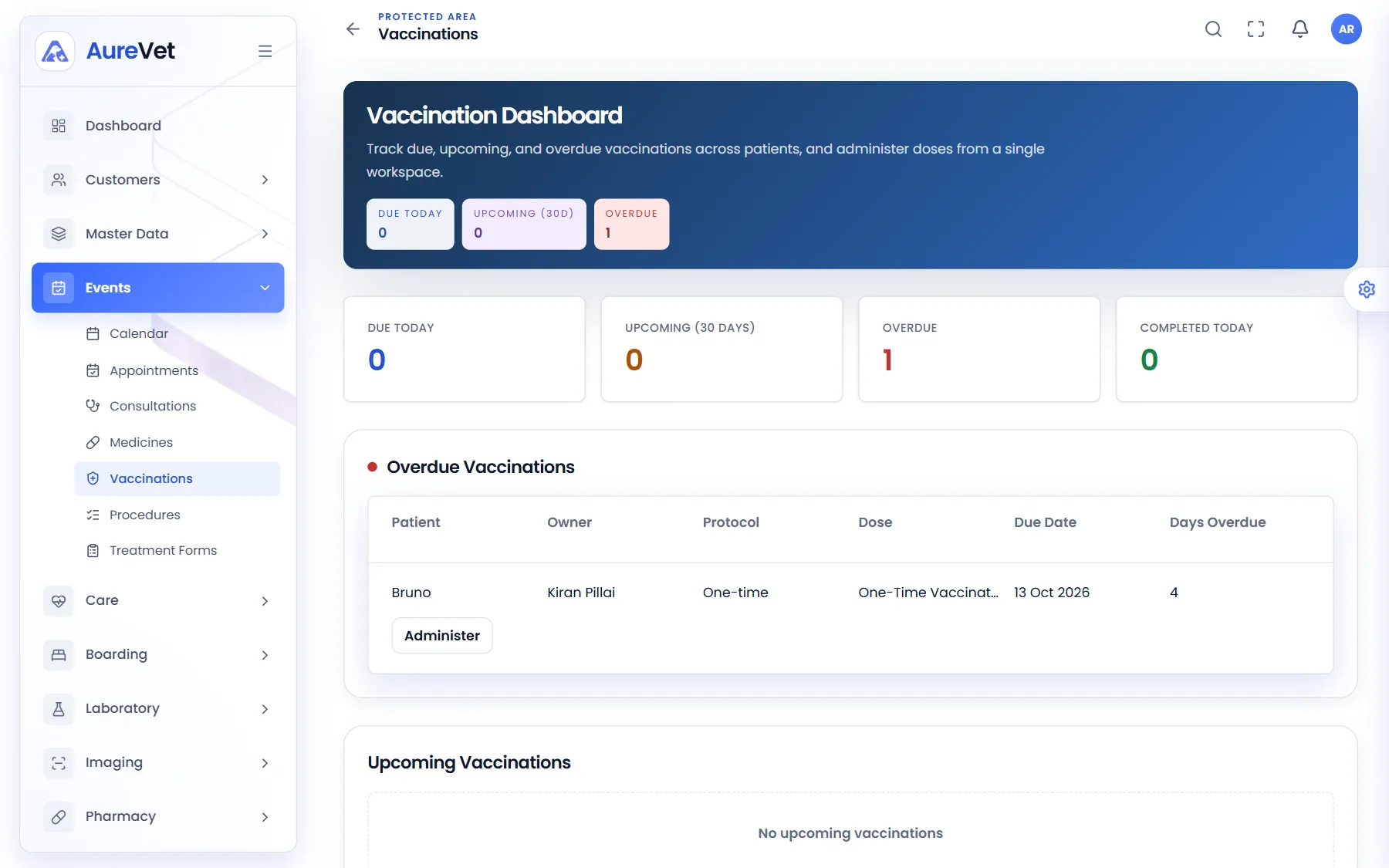
The vaccination dashboard shows what is due today, what is coming up and what is overdue. Give the dose from the same screen, and follow the protocols your clinic uses.

Due today, coming up, overdue and completed today, with a dose button on each row.
Sound familiar?
Due today, coming up, overdue and done today.
Every overdue pet and how long it has been.
Record a dose straight from the list.
Your clinic’s vaccination schedules per species.
Every vaccine given is on the pet’s record.
Vaccines carry their price and stock from the pharmacy.
In practice
What everyday tasks look like in Aurevet.
How to
Open the vaccination dashboard to see what is due and overdue.
Record the dose from the list. It goes on the pet’s record.
Vaccines come from the pharmacy, so stock and price follow automatically.
Yes. Set up the schedules your clinic follows for each species.
Part of the patient journey
Book a walkthrough and we will show you the modules your clinic would use day to day.